

There is a moment that happens on almost every product page with a dropdown for variations where the customer clicks on it, sees a list of text options, and has to mentally translate each one into what it actually looks like. Size L, Color Navy, Material Cotton. None of that tells them much on its own, and for a customer who is trying to make a quick decision about whether something is right for them, that extra mental step creates a kind of friction that most store owners do not even realize is costing them.
It is not dramatic friction, the kind that makes someone immediately leave the page; it is the quieter kind that builds up slowly across a shopping session and leaves customers feeling like the process was just slightly more effort than it needed to be. And in eCommerce, where the difference between a completed purchase and an abandoned one is often just a matter of confidence and ease, that quiet friction matters more than people tend to give it credit for.
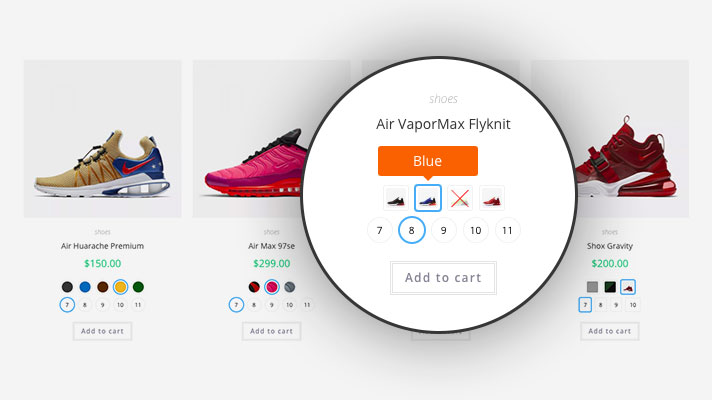
WooCommerce variation swatches replace all of that with something visual. Instead of reading a list of text options and imagining what they correspond to, customers see the actual color, the actual image of the variation, or a clearly labeled button, and they can make their selection in a fraction of the time with a lot more certainty about what they are choosing.
That shift sounds simple, but the way it changes how customers move through a product page is pretty significant, and this blog is going to break down exactly what that change looks like and why it happens.
The Problem With Dropdowns That Nobody Really Talks About
Dropdowns made sense in the early days of e-commerce when the technology for anything more visual was either not available or too complicated to implement without significant development work. They were functional, they got the job done, and for a long time, they were just accepted as the standard way of handling product variations online.
But customer expectations have moved on considerably since then, and what felt acceptable a decade ago now feels noticeably dated compared to what modern online shopping experiences look like.
The core issue with dropdowns is that they are entirely text-dependent, and text requires interpretation. When a customer sees a color option written as “Dusty Rose,” they have to form their own mental image of what that means, and the image they form might be completely different from what the product actually looks like.
When they see a color swatch in that exact shade of dusty rose, there is no interpretation required. They either like the color or they do not, and they can move on with their decision immediately without any uncertainty about whether their mental image matched reality.
That gap between what a text label suggests and what a product actually looks like is responsible for a lot of the hesitation and second-guessing that happens on product pages, and it is also a significant contributor to returns when customers receive something that does not match what they thought they were ordering.
How Visual Swatches Actually Change Customer Behaviour on the Page
When variation swatches for WooCommerce are in place, the way customers interact with a product page changes in a few ways that are worth understanding individually because each one has its own effect on the overall shopping experience.
The most immediate change is speed. Customers can scan available variations visually in a few seconds rather than opening a dropdown, reading through options, closing it, and repeating that for each attribute they need to select. For products with multiple variation types like color, size, and material, the difference in time and effort adds up quickly across a single shopping session.
The second change is engagement. Color swatches, image swatches, and well-designed button swatches are inherently more interactive and visually interesting than a plain dropdown menu. Customers tend to spend more time actively exploring the available variations when they are presented visually because clicking through swatches feels more like browsing than form-filling.
The third change is confidence. Seeing the exact color or the exact image of a variation before selecting it gives customers a level of certainty about their choice that a text label simply cannot provide. That certainty is what pushes hesitant customers toward a decision rather than away from one.
What the Variation Swatches as Radio Buttons Plugin Actually Offers
The Variation Swatches as Radio Buttons plugin by Extendons is what brings WooCommerce variation swatches properly into a store without requiring any custom development work. It replaces the default WooCommerce dropdown fields with visual swatches across both the product page and the shop page, and it gives store owners a solid amount of control over how those swatches look and behave.
In terms of the swatch types available, the plugin supports four distinct display formats. Color swatches show a solid color block or in the case of dual tone variations, two colors split within a single swatch tile. Image swatches display an actual product image or variation specific photo as the selectable option. Text label swatches present the variation name as a styled button rather than a dropdown item. And radio button swatches offer a clean button-based selection that works particularly well for size or style variations where a visual image is not necessarily needed.
Each of these types serves a different purpose, and the right one to use depends on the nature of the variation being displayed, which is why having all four available within a single plugin gives store owners the flexibility to handle different product types appropriately, rather than applying the same format to everything regardless of whether it fits.
Bringing Swatches to the Shop Page, Not Just the Product Page
One of the things that makes WooCommerce variation swatches genuinely impactful beyond just improving individual product pages is the ability to display swatches directly on the shop and category pages as well.
When swatches appear on product cards in the shop listing, customers can see and interact with available variations before they even open a product page. They can click through color options and watch the product image update to reflect the selected variation, or they can identify immediately that the color they want is available in that product without having to visit the page to find out.
For stores with large catalogues, this is a meaningful improvement to the browsing experience because it reduces the number of product pages a customer needs to open before finding what they are looking for.
The plugin also allows store owners to choose which attribute is displayed on the shop page at the product level, so you can control whether customers see color options, size options, or any other attribute directly from the listing, depending on which variation type is most relevant for each product.
Managing Out of Stock Variations Without Confusing Customers
Something that comes up pretty quickly once variation swatches for WooCommerce are in place is the question of how to handle variations that are currently out of stock. With a dropdown, this is often handled by simply removing the option or graying it out in the list, but with visual swatches, you have more options, and the choice you make affects how customers perceive and interact with the product.
The plugin gives you three ways to handle out-of-stock swatches, and each one sends a slightly different message to the customer.
Crossing out the swatch keeps it visible on the page with a line through it, which tells the customer that the variation exists and is part of the product range but is not currently available. This is useful when you expect the variation to come back into stock because it sets a customer expectation that they might be able to get it later.
Blurring the swatch makes it appear faded or washed out while keeping it technically visible, which is a softer way of indicating unavailability without fully removing the visual reference.
Hiding the swatch removes it from the page entirely when the variation is out of stock, which keeps the product page clean and only shows what is actually purchasable but does mean customers have no visibility into what other variations might exist or become available.
Customizing the Swatch Appearance to Fit the Store Design
A set of swatches that look visually inconsistent with the rest of a store’s design can feel like an afterthought, and that affects how professional and considered the product page feels overall. The plugin accounts for this through a set of customization options that give store owners control over how swatches are styled.
Shape settings let you choose between round and square swatches and set specific width and height dimensions for both the shop page and the product page independently, so you can have larger swatches on the product page where detail matters more and slightly smaller ones on the shop page where space is more limited.
Tooltip settings allow you to enable a small pop-up that appears when a customer hovers over a swatch, displaying either text or an image to give additional context about that variation before the customer commits to selecting it. For image swatches in particular, this is a nice feature because the tooltip can show a larger version of the variation image that gives the customer a clearer look.
Border settings let you add a border around swatches and customize the border color, which is a small detail but one that can make a noticeable difference to how polished the swatch display looks, particularly for color swatches where a clean border helps define the edge of the color block against different background colors.
The Variation URL Feature and Why It Is More Useful Than It Sounds
One feature within the plugin that does not always get the attention it deserves is the variation URL generator, which creates a unique shareable link for any specific product variation and its selected attributes.
What this means in practice is that if a customer has selected a particular color and size combination on a product page, they can share that exact URL with someone else, and the recipient lands directly on the product with those same variations already selected rather than having to navigate to them manually.
For stores where customers often share products with friends or family before making a purchase decision, this removes a small but real barrier from the process. Instead of saying “go to this product and select the navy blue in size medium,” the customer just sends a link, and the selection is already made.
It is also useful from a store owner’s perspective for things like sending product recommendations or running promotions that link directly to a specific variation rather than just the general product page.
Giving Customers the Ability to Edit Variations From the Cart
Another aspect of the plugin that directly improves how customers experience the shopping process is the ability to change a selected variation directly from the cart page without having to navigate back to the product page.
If a customer adds a product to their cart and then realizes they selected the wrong color or the wrong size, the normal WooCommerce experience requires them to go back to the product, reselect the correct variation, and add it to the cart again, usually after removing the wrong one first. That is a small but genuinely annoying process when all they want to do is change one attribute.
With this feature enabled, customers can update their variation selection directly from the cart, which keeps them in the checkout flow rather than sending them backwards through the shopping journey at the point where you most want them moving forward.
Conclusion
The shift from dropdown menus to WooCommerce variation swatches is one of those product page changes that has a real and visible effect on how customers interact with your store, even if it is not always immediately obvious why. Customers browse faster, they make selections with more confidence, they spend more time engaging with available variations, and they arrive at checkout with a clearer sense of what they are actually buying.
The Variation Swatches as Radio Buttons plugin by Extendons brings all of this to a WooCommerce store through a setup that covers everything from basic color and image swatches to dual tone variations, shop page display, tooltip customization, cart page variation editing, and shareable variation URLs.
The variation swatches for WooCommerce experience it creates is a meaningful step up from the default dropdown setup and one that tends to have a quiet but consistent positive effect on how customers feel about shopping in a store that has taken the time to get it right.