

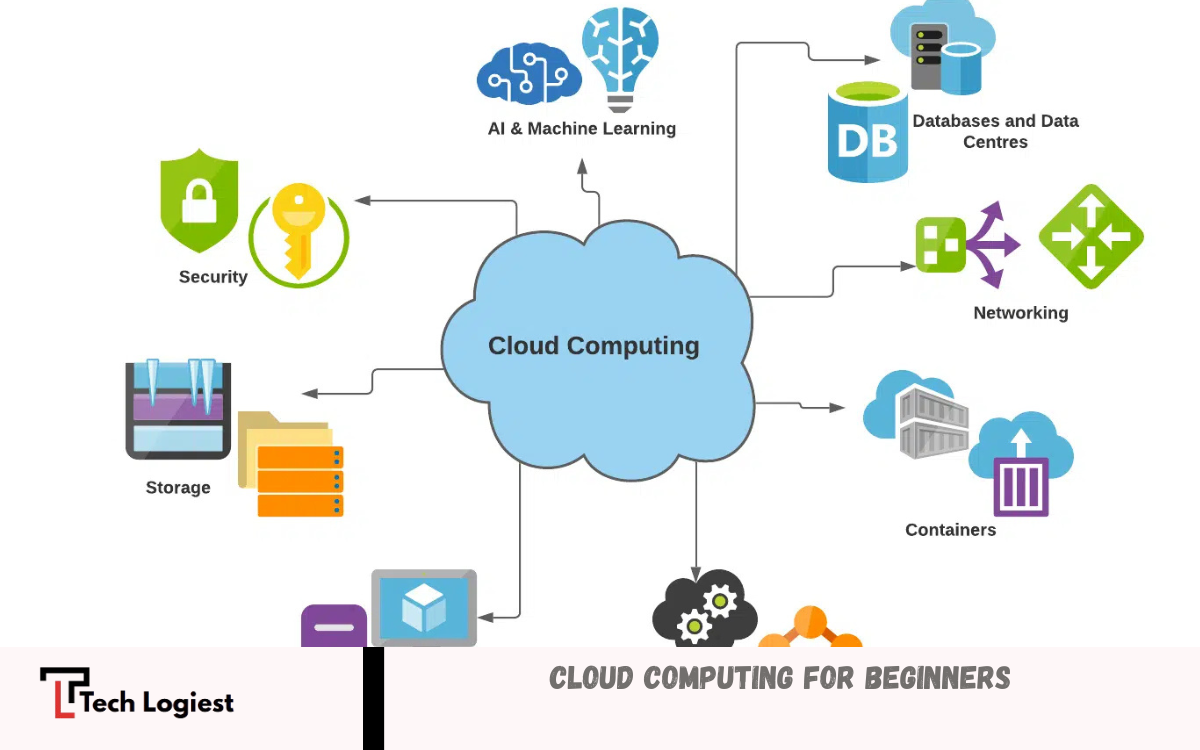
Cloud computing is a modern way of storing, managing, and accessing data and applications over the internet instead of relying on a personal computer or local server. For beginners, it can be understood as using online services to do tasks like saving files, running software, or hosting websites without needing powerful hardware at home or in the office.
All data and programs are stored on a single device, which can be risky if the system fails. Cloud computing solves this problem by storing information on remote servers that are maintained by large companies.
What Cloud Computing Means?
Cloud computing provides on-demand access to computing resources without direct management of hardware. Service providers maintain large data centers filled with servers. Users connect through internet, use required services, pay based on usage.
Traditional systems require investment in hardware, maintenance, upgrades. Cloud eliminates such burden. Instead of purchasing servers, businesses rent computing power instantly. This model supports scalability, reliability, global accessibility.
Key Characteristics of Cloud Computing
1. On-Demand Self-Service
Users access computing resources instantly without manual intervention from provider. Example: launching virtual server within minutes.
2. Broad Network Access
Services available through internet using laptops, smartphones, tablets. Location independence improves productivity.
3. Resource Pooling
Providers share resources across multiple users. Infrastructure dynamically allocated based on demand.
4. Rapid Elasticity
Scale resources up or down quickly. Businesses handle traffic spikes without downtime.
5. Measured Service
Usage tracked automatically. Billing depends on consumption—storage, bandwidth, computing time.
Types of Cloud Computing
1. Public Cloud
Public cloud services delivered over internet, shared among multiple users. Cost-effective, widely accessible. Examples include storage platforms, email services, streaming applications.
2. Private Cloud
Private cloud dedicated to single organization. Higher control, security, customization. Suitable for sensitive data, regulated industries.
3. Hybrid Cloud
Hybrid model combines public cloud, private cloud. Businesses maintain critical data privately while using public cloud for scalability.
Cloud Service Models
1. Infrastructure as a Service (IaaS)
Provides virtualized computing resources such as servers, storage, networking. Users control operating systems, applications. Suitable for developers, IT teams.
2. Platform as a Service (PaaS)
Offers environment for application development without managing infrastructure. Developers focus on coding, deployment.
3. Software as a Service (SaaS)
Delivers software applications through browser. No installation required. Examples include email platforms, collaboration tools, online editors.
Read Also: Amazon Affiliate Income 2026
Benefits of Cloud Computing
Cost Efficiency
No need for expensive hardware purchases. Pay-as-you-go model reduces upfront investment.
Scalability
Adjust resources instantly based on demand. Ideal for growing businesses.
Accessibility
Access data, applications anytime, anywhere with internet connection.
Reliability
Cloud providers ensure high uptime, backup systems, disaster recovery solutions.
Security
Advanced security measures including encryption, authentication, monitoring protect user data.
Collaboration
Teams work simultaneously on shared files, projects from different locations.
Challenges in Cloud Computing
Data Privacy Concerns
Sensitive information stored on remote servers raises privacy issues. Strong security policies required.
Internet Dependency
Cloud services require stable internet connection. Connectivity issues affect access.
Limited Control
Users rely on provider infrastructure. Less control over hardware, backend systems.
Vendor Lock-In
Switching providers becomes difficult due to compatibility issues, migration complexity.
Common Use Cases
Data Storage
Individuals store photos, documents, backups online instead of local drives.
Web Hosting
Businesses host websites, applications on cloud servers for better performance, scalability.
Software Development
Developers build, test, deploy applications using cloud platforms.
Streaming Services
Cloud enables video streaming, music platforms with high availability.
Business Applications
Companies use cloud-based CRM, accounting tools, project management systems.
Cloud Computing in Everyday Life
Many daily activities depend on cloud computing. Email services, social media platforms, online banking, file sharing tools operate through cloud infrastructure. Users interact with cloud systems without realizing underlying technology.
Security in Cloud Computing
Security remains critical concern. Providers implement measures such as:
- Data encryption during transmission, storage
- Multi-factor authentication
- Regular security updates
- Monitoring for threats
Users must follow best practices: strong passwords, access control, regular backups.
Future of Cloud Computing
Cloud computing continues evolving with emerging technologies:
Artificial Intelligence Integration
Cloud platforms offer AI tools for automation, data analysis, decision-making.
Edge Computing
Processing data closer to source reduces latency, improves performance.
Serverless Computing
Developers run code without managing servers. Focus shifts entirely toward application logic.
Multi-Cloud Strategies
Organizations use multiple cloud providers for flexibility, risk reduction.
Getting Started with Cloud Computing
Beginners can start learning cloud computing through simple steps:
- Understand basic concepts, terminology
- Explore free cloud platforms for practice
- Learn storage services, virtual machines
- Build small projects such as hosting website
- Study security fundamentals
- Gradually explore advanced services
Consistent practice builds confidence, practical skills.
Frequently Asked Questions
What are common examples of cloud computing?
Examples include email services, online storage platforms, video streaming services, and web-based applications like document editors.
What is the difference between cloud storage and cloud computing?
Cloud storage is a part of cloud computing. Storage focuses on saving data online, while cloud computing includes servers, software, networking, and more.
Do I need an internet connection for cloud computing?
Yes, a stable internet connection is required to access cloud services.
What are the main types of cloud computing?
The main types include public cloud, private cloud, and hybrid cloud.
Can small businesses use cloud computing?
Yes, cloud computing is ideal for small businesses because it reduces costs and allows easy scaling.
What is the future of cloud computing?
Cloud computing will continue growing with technologies like artificial intelligence, edge computing, and serverless architecture, making systems faster and more efficient.
Conclusion
Cloud Computing for Beginners becomes easier once core ideas understood. Cloud technology transforms traditional computing by offering flexible, scalable, cost-effective solutions through internet-based services. Businesses, individuals benefit from improved efficiency, accessibility, collaboration.
Despite challenges such as security concerns, dependency on internet, advantages outweigh limitations. Future developments indicate stronger integration with advanced technologies, making cloud computing essential skill in digital era.
